
Do I need the original performance video?
No. This tool uses two reference photos and a fixed studio-and-choreography template. You do not upload the original video.
Upload two permitted photos, select a video format, generate a silent Hotel Lobby-style duet, then add licensed music in your social app.
By Hotel Lobby AI · Updated
Photo 1 becomes the performer on the left, and Photo 2 the performer on the right. Use one well-lit subject in each image, avoiding covered faces, tiny portraits or heavy cropping.
Choose Lite, Standard or HD, then select an available duration and aspect ratio. Vertical 9:16 suits short-form posts; landscape and 4:3 are also available when shown in the generator.
Sign in and review the exact credit cost before generating. New accounts can try one free Lite 4s video using signup credits; buy more credits for further videos. Watch the finished video for face consistency, positioning and gestures; results vary by input images and model output.
Download the silent MP4. In TikTok, select Add sound, choose a track available to your account and adjust the starting point to match the performance. Check the platform's music-use rules before publishing.
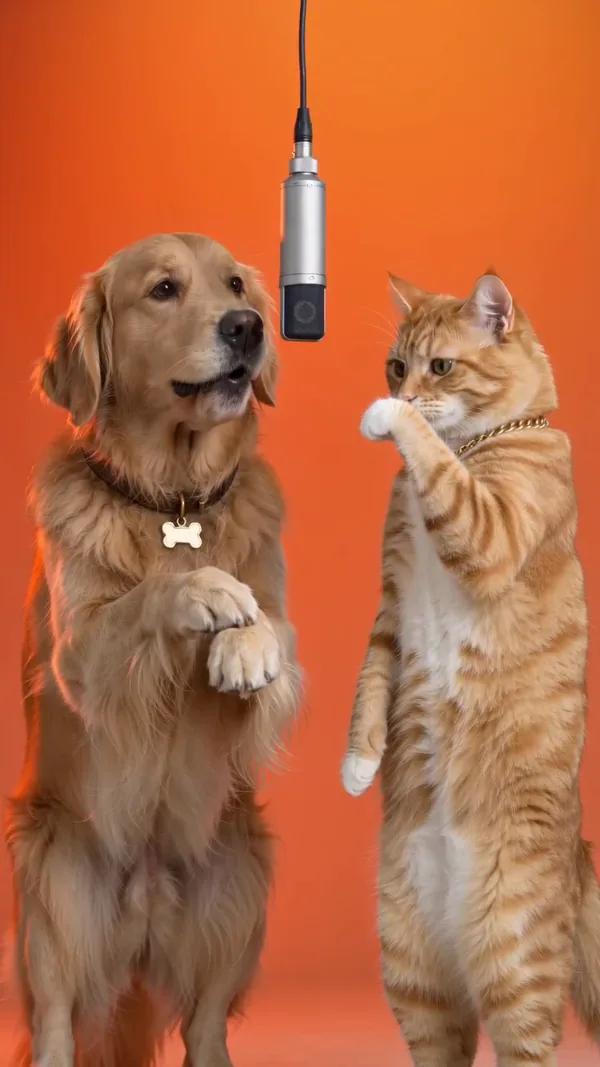
Our real Lite example is a 15-second silent MP4. The stage has a bright orange background and one hanging microphone. The example shows output—not a promise that every pair of photos produces identical motion.
We use fictional AI-generated performers in the public examples. Private customer uploads are not published here.
Watch the actual 9:16 outputSupported formats and credit rates are taken from the current generator configuration. The final cost is always shown before you submit.
| Quality | 4s | 10s | 15s |
|---|---|---|---|
| Lite 480p | 24 credits | 60 credits | 90 credits |
| Standard 480p | 60 credits | 150 credits | 225 credits |
| HD 720p | 100 credits | 250 credits | 375 credits |
Output ratios currently offered: 9:16 / 16:9 / 4:3. Read the Pricing page for packs and subscription terms.
New Hotel Lobby AI videos have no original soundtrack. Adding a track in TikTok or another editor is a separate step; only select music that the platform and your account permit you to use.
See TikTok instructions for adding sounds and the community overview of the visual trend.
No. This tool uses two reference photos and a fixed studio-and-choreography template. You do not upload the original video.
Use clear, well-lit photos showing one adult person per image, with visible faces and some upper-body detail. Only upload images you own or have permission to use. Photos depicting minors are not allowed.
Lite uses the lowest-cost quality tier. Check the current duration and credit estimate in the generator before deciding whether to use HD.
No. New video downloads are silent, with lip movements. Add a track you are permitted to use in TikTok or another editor. Music availability depends on your account and region.
If a video fails to start or is confirmed to have failed, the reserved credits are returned automatically. Successful generations use the credits shown before you submit.